
Time & Room Temperature Display for mounting on Center Microphone Stand, Temperature and CO2 levels are derived from either the Room Controller or remote ENS160+AHT21 Devices
 Benjamin Harris
5f79b4f0f3
Add setup portal, clock/date formats, battery and power saving
Benjamin Harris
5f79b4f0f3
Add setup portal, clock/date formats, battery and power saving
|
1 lună în urmă | |
|---|---|---|
| documents | 2 luni în urmă | |
| include | 1 lună în urmă | |
| lib | 1 lună în urmă | |
| src | 1 lună în urmă | |
| .gitignore | 2 luni în urmă | |
| CLAUDE.md | 1 lună în urmă | |
| README.md | 1 lună în urmă | |
| platformio.ini | 2 luni în urmă |
README.md
ESP32-S3 RLCD 4.2 Indoor / Outdoor Temperature Display
A simple, clean desktop temperature and clock display built around the WaveShare ESP32-S3-RLCD-4.2.
The display is designed to make the information readable from a distance, with the current time occupying the upper half of the screen and indoor/outdoor temperatures displayed prominently across the lower half.
Display Layout
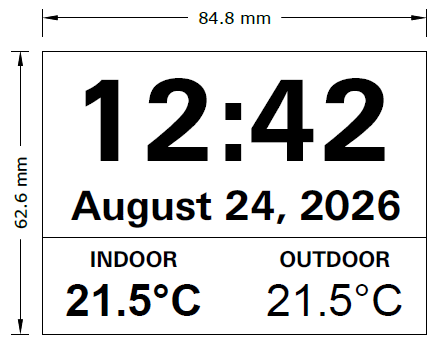
The display uses the full 300 × 400 pixel resolution of the 4.2-inch reflective LCD.
Display Sections
Top 60%
- Large digital time
- Current date underneath
- Time displayed in a very large, bold font
- 24-hour format
Date displayed as:
- Day of week
- Day
- Month
A small battery indicator sits in the top right corner. It can be turned off in the setup page.
Bottom 40%
- Two equal-width temperature sections
- Indoor temperature on the left
- Outdoor temperature on the right
- Large, bold temperature values
- Temperature displayed in °C
- Optional small labels above each temperature
Hardware
Main Controller / Display
WaveShare ESP32-S3-RLCD-4.2
The board provides:
- ESP32-S3 dual-core LX7 processor
- Up to 240 MHz
- 16 MB Flash
- 8 MB PSRAM
- 2.4 GHz Wi-Fi
- Bluetooth 5 LE
- 4.2-inch reflective LCD
- 300 × 400 pixel resolution
- PCF85063 real-time clock
- SHTC3 temperature/humidity sensor
- TF card interface
- USB Type-C
- 18650 battery holder
- RTC backup battery support
The onboard SHTC3 provides the indoor temperature measurement. The PCF85063 provides hardware real-time clock functionality.
The 4.2-inch panel is fully reflective and has no backlight or frontlight. It is read by room light alone, which means it needs no power to hold an image but also cannot be read in the dark. Both facts shape the power saving below.
Battery voltage is measured through the onboard divider on ADC1 channel 3 (GPIO4). The divider sits downstream of the charger, so the firmware reports cell voltage but cannot distinguish "charging" from "fully charged".
Optional: ambient light sensor
A BH1750 module on the expansion header lets the display detect an unlit room and sleep. It is optional — without it the same decision is made from the clock using configurable quiet hours.
| BH1750 | Board |
|---|---|
| VCC | 3V3 |
| GND | GND |
| SDA | GPIO 13 |
| SCL | GPIO 14 |
| ADDR | leave unconnected |
It shares the existing I²C bus with the RTC and the SHTC3, so no GPIO is consumed. Both possible addresses (0x23 and 0x5C) are probed at boot, and the setup page reports whether the sensor was found along with the current lux reading.
See the official hardware documentation:
WaveShare ESP32-S3-RLCD-4.2 Documentation
Outdoor Temperature
The outdoor temperature will be supplied separately from the display.
The preferred architecture is:
Outdoor Sensor
      │
      │ Wi-Fi
      ▼
ESP32-S3-RLCD-4.2
      │
      ├── Indoor Temperature
      ├── Outdoor Temperature
      ├── Date
      └── Time
The outdoor sensor can be another ESP32-based device, a network temperature sensor, MQTT source, HTTP API, or another compatible data source.
The display should continue showing the last known outdoor temperature if the outdoor sensor temporarily becomes unavailable.
Software
The project is intended to run on the ESP32-S3 using the Arduino framework.
Development Environment
Recommended:
- Visual Studio Code
- PlatformIO
- Arduino framework
- ESP32-S3 board support
WaveShare officially supports both Arduino IDE and ESP-IDF for this board.
Proposed Software Architecture
                    ┌─────────────────────┐
                    │      ESP32-S3       │
                    │                     │
                    │   Main Application  │
                    └──────────┬──────────┘
                               │
              ┌────────────────┼────────────────┐
              │                │                │
              ▼                ▼                ▼
        ┌───────────┐    ┌───────────┐    ┌───────────┐
        │    RTC    │    │   SHTC3   │    │   Wi-Fi   │
        │ PCF85063  │    │  Indoor   │    │           │
        └─────┬─────┘    └─────┬─────┘    └─────┬─────┘
              │                │                │
              │                │                │
              │                │         Outdoor Temp
              │                │                │
              └────────────────┼────────────────┘
                               │
                               ▼
                     ┌──────────────────┐
                     │  Display Engine  │
                     └────────┬─────────┘
                              │
                              ▼
                     ┌──────────────────┐
                     │  300 × 400 RLCD  │
                     └──────────────────┘
Display Design
The UI should remain intentionally simple.
There should be no unnecessary menus, icons, animations, or small text.
The primary purpose of the display is to provide information that can be read quickly from across a room.
Time
The time should be the largest element on the display.
Example:
11:08
The seconds should not normally be displayed.
The display should update once per minute.
24-hour and 12-hour formats are both selectable in the setup page; 24 hour is the default.
Date
The date is positioned directly underneath the time.
Example:
MONDAY 24 AUGUST
The arrangement is configurable — see Time and date format.
Indoor Temperature
The indoor temperature comes from the onboard SHTC3 sensor.
Example:
       INDOOR

       21.5°C
Outdoor Temperature
The outdoor temperature is received over the network.
Example:
       OUTDOOR

       14.8°C
Data Update Rates
| Data | Source | Update Rate |
|---|---|---|
| Time | PCF85063 RTC | 1 minute |
| Date | PCF85063 RTC | 1 day |
| Indoor temperature | SHTC3 | 30–60 seconds |
| Outdoor temperature | Network | 30–60 seconds |
| Display | RLCD | As required |
The display should avoid unnecessary full-screen refreshes.
Network Behaviour
On startup, with no Wi-Fi configured, the display raises its own access point and shows the setup screen instead of the clock. See Configuration.
Otherwise, on startup:
- Initialise the display.
- Initialise the RTC.
- Read the onboard SHTC3 sensor.
- Connect to Wi-Fi.
- Obtain the current time.
- Obtain the outdoor temperature.
- Draw the complete display.
During normal operation:
- Update the RTC time.
- Read the indoor temperature.
- Check for a new outdoor temperature.
- Update the display when required.
If Wi-Fi is unavailable:
- Continue displaying the time.
- Continue displaying the indoor temperature.
- Display the last known outdoor temperature.
- Indicate that the outdoor reading is stale if required.
- Retry the connection in the background.
Losing Wi-Fi does not return the display to setup mode. A working clock on screen matters more than an opportunity to reconfigure, so the setup access point appears only when no network is stored or when KEY is held at power-up.
Time Synchronisation
The ESP32-S3 should synchronise the RTC from an NTP server when network connectivity is available.
Recommended configuration:
NTP Server:
pool.ntp.org

Time Zone:
Australia/Hobart

Format:
24 hour
The NTP server and timezone are both set in the setup page; the values above are the defaults.
The RTC then maintains the time locally when Wi-Fi is unavailable. It stores UTC, so a daylight saving change needs no intervention.
Temperature Display
Temperatures should be displayed with one decimal place.
Examples:
21.5°C
19.0°C
7.8°C
-2.3°C
The degree symbol should be displayed as:
°C
Error Handling
No Wi-Fi
The display continues operating from the local RTC.
OUTDOOR

--.-°C
or, if a previous value is available:
OUTDOOR

14.8°C
The previous value should preferably remain visible rather than replacing it immediately with an error value.
Sensor Error
If the SHTC3 cannot provide a valid indoor temperature:
INDOOR

--.-°C
RTC Error
If the RTC has lost its valid time:
--:--
The system should attempt to correct the time as soon as network connectivity becomes available.
Project Structure
A suggested project structure:
/
├── README.md
├── platformio.ini
│
├── src/
│   ├── main.cpp
│   ├── display.cpp
│   ├── display.h
│   ├── rtc.cpp
│   ├── rtc.h
│   ├── temperature.cpp
│   ├── temperature.h
│   ├── network.cpp
│   ├── network.h
│   ├── outdoor.cpp
│   ├── outdoor.h
│   ├── settings.cpp
│   ├── settings.h
│   ├── portal.cpp
│   ├── portal.h
│   ├── battery.cpp
│   ├── battery.h
│   ├── ambient.cpp
│   ├── ambient.h
│   ├── power.cpp
│   └── power.h
│
├── include/
│   ├── config.h
│   └── i2c_bus.h
│
└── lib/
    └── ST7305_U8g2/
settings holds the runtime configuration in flash; portal serves the setup
web page. Fonts are compiled in from the U8g2 library, so no font files are
shipped.
Configuration
All user-specific settings are entered on the display itself through a setup web page. Nothing needs to be edited or recompiled, and no credentials are stored in the repository.
First-time setup
- Power on the display. With no Wi-Fi stored it shows the setup screen and raises its own Wi-Fi network.
On a phone or laptop, join:
Network:   TempDisplay-Setup
Password:  temp1234
The setup page should open by itself. If it does not, browse to
http://192.168.4.1.Choose your Wi-Fi network from the list and enter its password.
Enter the outdoor temperature source URL and, for a JSON response, the field holding the value.
Check the timezone, then press Save and restart.
The display reboots, joins your network, sets its clock from NTP and begins showing data.
Changing settings later
Once the display is on your network the same page is available at
http://temp-display.local or at the display's IP address. This is the place
to change the outdoor source without touching the Wi-Fi settings.
To return to the setup access point — after moving house, or changing the Wi-Fi password — hold the KEY button while powering the display on. Erase all settings on the page does the same thing.
Settings
| Setting | Notes |
|---|---|
| Wi-Fi network and password | Chosen from a scan, or typed in for a hidden network |
| Outdoor source URL | An HTTP address returning the outdoor temperature |
| JSON field | The field holding the value, e.g. temperature or main.temp. Blank if the response is a bare number |
| Time format | 24 hour (14:05) or 12 hour (2:05 PM) |
| Battery indicator | Whether to show the corner icon |
| Panel low-power mode | Lowers the screen's internal refresh rate |
| Sleep when dark | Whether to rest in an unlit room |
| Darkness threshold | In lux, with the live reading shown beside it |
| Quiet hours | Used only when no light sensor is fitted |
| Date format | Picked from a list, or given as a strftime pattern |
| Capitals | Whether the date line is upper case |
| Timezone | Picked from a list, or given as a POSIX TZ string |
| NTP server | Defaults to pool.ntp.org |
Time and date format
The time is shown either as 24 hour or as 12 hour with an AM/PM suffix. In
12-hour mode the leading zero is dropped, midnight is 12:00 AM and noon is
12:00 PM.
The date line is chosen from a list of common arrangements, or given directly
as a strftime(3) pattern:
| Pattern | Result |
|---|---|
%A %e %B |
MONDAY 24 AUGUST |
%A %e %B %Y |
MONDAY 24 AUGUST 2026 |
%B %e, %Y |
AUGUST 24, 2026 |
%a %e %b %Y |
MON 24 AUG 2026 |
%d/%m/%Y |
24/08/2026 |
%Y-%m-%d |
2026-08-24 |
The useful fields are %A day, %a short day, %B month, %b short month,
%e date, %d date padded to two digits, %Y year and %y short year.
The setup page shows a live preview of both lines, rendered by the display itself using the same code that draws the panel, so what the preview shows is what appears on screen. A long date is automatically set in a smaller size rather than being allowed to run off the edge.
Settings are held in the ESP32's own flash and survive both power loss and a firmware update.
Outdoor source format
Either form is accepted:
14.8
{ "temperature": 14.8 }
The setup page has a Test this source button that fetches the URL and reports the temperature it read, so a wrong address or field name can be corrected before saving.
Battery and Power Saving
The display is designed to run from the 18650 cell for as long as possible.
While the room is lit
- The CPU runs at 80 MHz rather than 240 MHz.
- Wi-Fi uses modem sleep between beacons.
- The panel runs in its own low-power driving mode, which lowers its internal refresh rate — appropriate for content that changes once a minute.
- The screen is redrawn only when a displayed value actually changes.
While the room is dark
Because the panel is reflective, an unlit room is the cheapest possible time to stop working — the image already on screen stays there with no power at all.
- Wi-Fi is switched off entirely.
- The ESP32 drops into light sleep, waking every 20 seconds only to sample the light level. The duty cycle is well under 1%.
- Nothing is redrawn; the last image remains on the panel.
- On waking, the network reconnects and the outdoor temperature is refetched immediately rather than waiting out the normal interval.
Pressing KEY wakes the display at once.
The threshold is set in lux and has hysteresis, so a room hovering near the boundary cannot chatter the display in and out of sleep. With no light sensor fitted, the quiet hours are used instead — 23:00 to 06:00 by default.
Sleeping is suppressed for a minute after anyone uses the settings page, so the Wi-Fi is never dropped mid-configuration, and never happens at all while the setup access point is up.
Battery indicator
The top right corner shows a four-bar battery icon, derived from a lithium-ion discharge curve rather than a straight voltage scale. It is deliberately coarse — it only has to answer "should I be thinking about charging" — and quantising it to quarters also means normal voltage noise causes no screen refresh. Below 25% the icon shows as an empty outline.
The setup page shows the exact voltage and percentage.
Future Features
Potential future additions:
- MQTT outdoor temperature
- Multiple outdoor sensors
- Humidity display
- Weather forecast
- Weather icons
- Indoor/outdoor humidity
- Wi-Fi signal indicator
- OTA firmware updates
- Custom temperature units
- Minimum/maximum temperature
- Historical temperature logging
- TF card data logging
- Multiple display layouts
Screen brightness control is not possible on this board: the panel is reflective with no backlight to adjust.
Design Goals
The project should follow these principles:
- Large, readable information
- Minimal UI
- Low power consumption
- Reliable local timekeeping
- Continued operation without Wi-Fi
- Clear indoor/outdoor temperature separation
- Fast display updates
- Simple configuration
The WaveShare board is particularly suited to this application because the RLCD provides a reflective display without a conventional backlight, while the board already includes the RTC and indoor temperature/humidity sensor required by the application.
Hardware Documentation
Official documentation:
Licence
This project is released under the terms specified by the repository owner.